Syspro FileHub: A Practical Guide to Document Management
Managing documents across shared folders, spreadsheets, email and separate document management systems can make it difficult for teams to find the information they need. Syspro FileHub is included with subscription licensing and offers a practical way to improve document organization without implementing a full-scale, third-party document management system.
What Is Syspro FileHub?
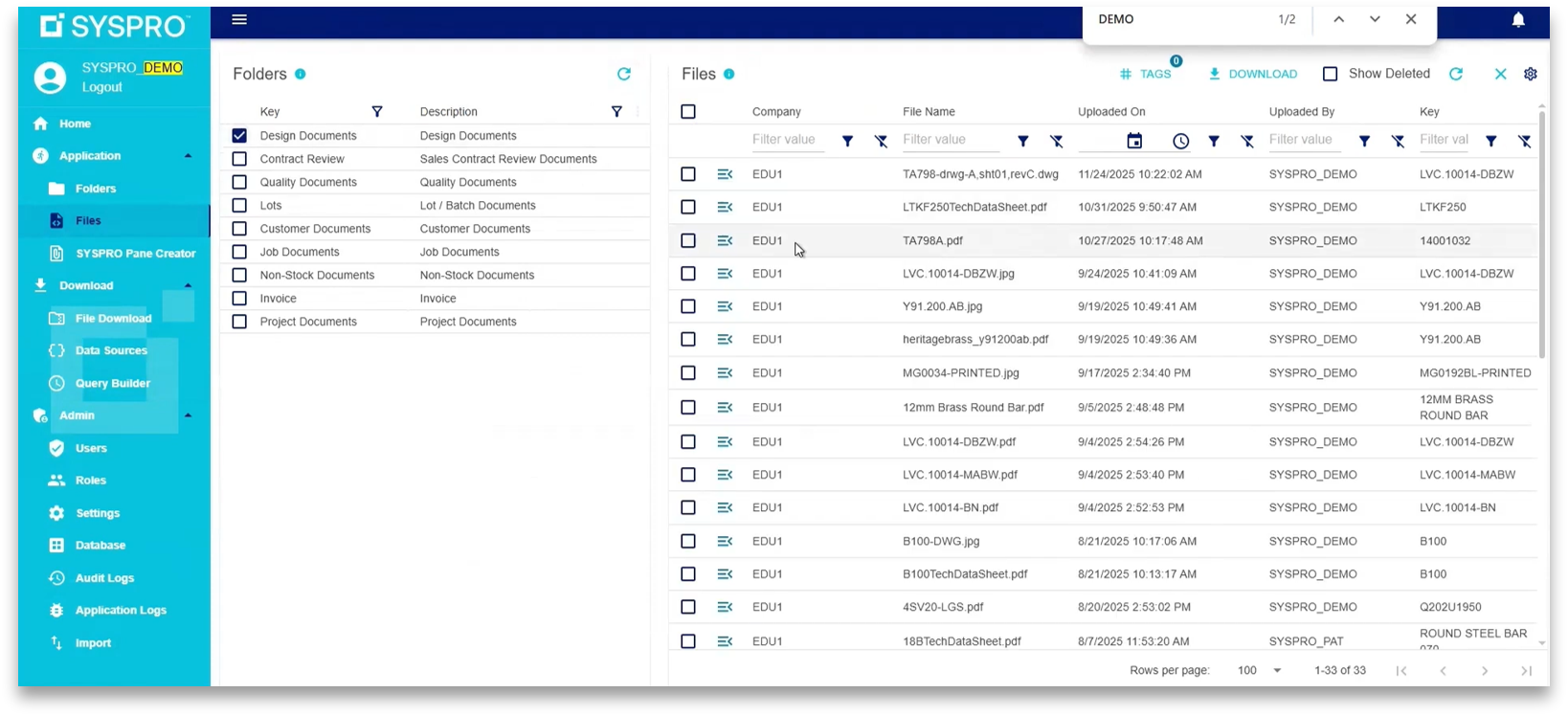
Syspro FileHub is a centralized document management system that allows users to store, organize, search and access files from within Syspro or through a web browser. It builds on the picture and document attachment capabilities previously available through Syspro Multimedia, introducing a modern interface, folder-based organization, document version control, tagging and improved visibility into stored files. Rather than searching through separate folders or opening individual attachments, users can access documents directly from the related record in Syspro.
FileHub can be used to manage documents, pictures and files against master records like:
Customers
Suppliers
Stock codes
Purchase orders
Sales orders
Product information
Quality documentation
Design and engineering files
Work instructions
Supplier documentation
Other business records
Key Features of Syspro FileHub
Centralized Document Storage
FileHub provides one location for organizing business documents. Administrators can create folders based on business processes, departments, document types or user requirements. For example, a manufacturing or distribution company could create folders for:
Quality documents
Product specifications
Design documents
Purchase order documents
Supplier documentation
Work instructions
Signed forms
This structure makes it easier for users to locate the information they need and helps reduce reliance on disconnected file storage locations.
Document Version Control
FileHub allows users to manage multiple versions of a document. The latest published version is displayed to users, while previous versions remain available for reference. Maintaining document history helps teams understand when a file was updated and who uploaded each version. Version control can be particularly useful for documents such as:
Product specifications
Engineering drawings
Work instructions
Quality procedures
Supplier documentation
Customer forms
Searchable Tags
Users can add tags to documents to make them easier to find. A document could be tagged by product, process, department or intended use. Users can then search or filter documents using those tags instead of relying only on file names or folder locations.
Document Preview, Download and Printing
FileHub allows users to preview documents directly within the application. Depending on the file type and permissions, users can also download or print documents. This makes it easier to review supporting information without leaving Syspro or navigating through multiple applications.
Role-Based Security
FileHub supports user and role-based permissions. Access can be managed through FileHub roles or synchronized with existing Syspro roles. This allows businesses to control which users can view, add or manage documents, especially for sensitive documents. Standard users can access the files available to them through the web console using a password-protected login.
Audit Logs
FileHub includes audit logs that provide visibility into document activity, including when files were uploaded and other changes made to documents. Audit information can support organizations that need stronger documentation practices and meet requirements for SOC, ISO or quality compliance. Businesses can also define how long audit information is retained.
Browser-Based Access
FileHub can be installed on the server, while users access it through a browser, although SSL certificate is recommended. This allows employees to access documents from their computers without needing to work directly in the administration interface.
FileHub supports access through both regular Syspro and Avanti. SSL certificates, single sign-on (SSO), and multi-factor authentication (MFA) can also be used to support a more secure access experience.
Accessing Documents From Within Syspro
One of the main advantages of FileHub is its connection to Syspro records. Administrators can create FileHub panes in Syspro or cards in Avanti. Once configured, users can access documents associated with a specific customer, supplier, stock code, purchase order or other key record.
How Do You Add Documents to FileHub?
Adding a document is designed to be straightforward. Users can upload files into the appropriate folder and, where permitted, add tags, rename the file or organize it with other related documents. FileHub also includes an import function for businesses that already have documents stored on a server. An Excel template can be used to provide the file information and target locations, allowing FileHub to import documents from existing folders.
There is no direct migration path from every third-party document management system. However, documents that are available in accessible folders can be imported using FileHub’s native upload/import tools.
Who Can Use Syspro FileHub?
FileHub supports two types of users:
Syspro users, who access FileHub through their existing Syspro credentials
FileHub-only users, who can access permitted documents without being Syspro users
This can be useful for departments such as quality, production or administration, where employees may need access to business documentation but do not require full Syspro access. FileHub-only users are not limited in the same way as Syspro users, making it possible to provide document access to a broader group of employees, subject to the organization’s security setup.
Is FileHub a Full Document Management System?
FileHub provides many practical document management capabilities, but it is not intended to replace every function of a comprehensive third-party document management system. A full document management solution may offer more advanced functionality for highly regulated environments, formal approval workflows or complex document governance requirements.
FileHub’s main advantage is its direct connection to Syspro. Documents can be linked to the business records employees already use, including customers, suppliers, stock codes and orders. For organizations that need straightforward document storage, organization, access and version visibility, FileHub can provide a practical alternative to managing attachments or maintaining a separate document repository.
What Syspro Version Is Required?
FileHub is available for Syspro 8 users. We recommended using a later Syspro 8 version, with testing completed on Syspro 8 2024 and newer versions. Customers should confirm their specific version and licensing requirements before implementation.
FileHub has a separate license that is requested with the Syspro subscription license. Installation and setup can be completed on the customer’s server.
Preparing for a FileHub Implementation
Although FileHub is designed to be quick to install and easy to use, some preparation will help ensure a successful setup. Planning the folder structure and security permissions in advance can reduce the need to reorganize the system later.
Before implementation, consider:
Who needs access to documents?
Identify the departments and users who will use FileHub.What permissions are required?
Determine who can view, upload, edit or manage documents.How should documents be organized?
Decide whether folders should be based on departments, processes, document types or Syspro records.Which documents should be imported?
Review existing folders and identify the documents that should be moved into FileHub.Which documents should be linked to Syspro?
Identify the customer, supplier, stock code, purchase order or other records where documents should be accessible.
Is Syspro FileHub Right for Your Business?
Syspro FileHub can be a useful option for businesses that want to improve document management without investing in a third-party, fully licensed document management platform.
It is particularly relevant for organizations that need to:
Centralize business documents
Access files directly from Syspro
Improve document organization
Track document versions
Enhance search using tags
Support quality and audit requirements
Provide document access to non-Syspro users
Reduce reliance on shared folders and disconnected files
The best approach depends on the complexity of your document management requirements. For many organizations, FileHub offers a practical way to improve document visibility and accessibility while keeping documentation connected to the ERP system.
Summary of FileHub Capabilities
Capability | FileHub |
|---|---|
Syspro native integration | Built-in |
Compliance tracking | SOC, ISO and quality compliance |
Ease of implementation | Quick and easy |
Usability and interface | User-friendly, drag-and-drop, web-based |
Security | SSO enabled, supports MFA |
Pricing model | Included in subscription |
About the Author
Umbrella Consulting
Umbrella Consulting's multi-disciplinary team comprises finance and manufacturing specialists, technology experts, and business process practitioners. Great Consultants. Great Outcomes. By Design.